LOSSLESS SCALING

BOOST YOUR FPS

UP TO 2X FRAME RATE MULTIPLIER

Master frame generation & upscaling technology. Transform your gaming experience with cutting-edge LSFG 3.0 and intelligent scaling algorithms for laptops and gaming PCs.

2X
FPS BOOST
50%
BATTERY SAVED
<1ms
INPUT LAG
1000+
GAMES

WHAT IS LOSSLESS SCALING?

Lossless Scaling is a revolutionary Windows application designed to enhance gaming performance through advanced frame generation and upscaling technologies.

Whether you're gaming on a budget laptop or a high-end gaming PC, Lossless Scaling can significantly boost your frame rates and improve visual quality without compromising gameplay experience.

The software utilizes cutting-edge algorithms to generate additional frames between existing ones and intelligently upscale lower resolutions to higher displays, making it an essential tool for gamers seeking smoother gameplay.

LSFG 3.0 Technology
Multi-Algorithm Support
Universal Compatibility
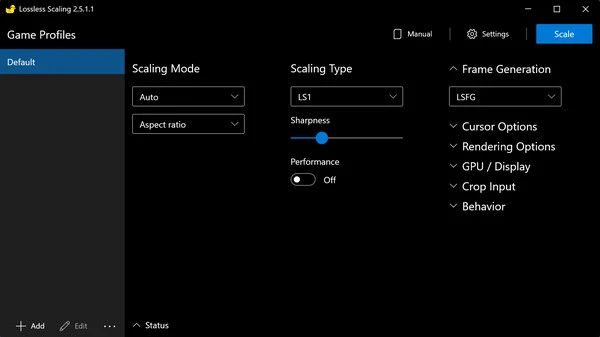
Lossless Scaling Interface showing frame generation and upscaling options

POWERFUL FEATURES

Everything you need to maximize your gaming performance

FRAME GENERATION

Boost FPS by up to 2x with cutting-edge LSFG 2.3 and the latest LSFG 3.0 technology. Generate smooth intermediate frames for ultra-fluid gameplay even on demanding titles.

Learn More

UPSCALING ALGORITHMS

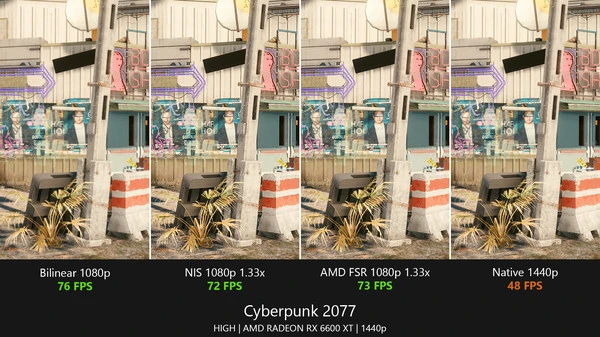
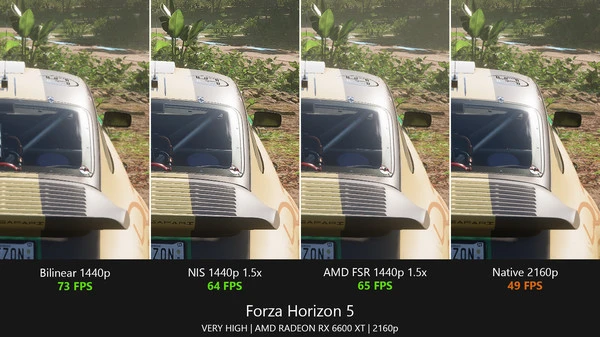
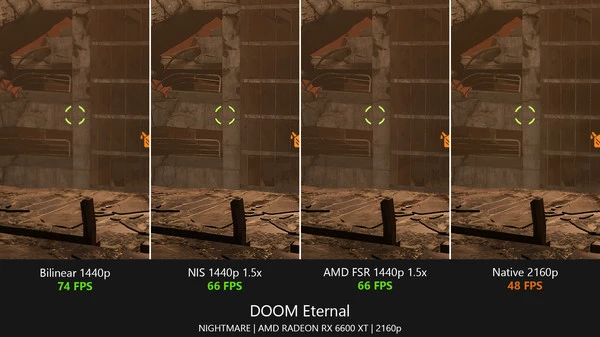
Choose from FSR, NIS, Anime4K, xBR, or proprietary LS1 algorithms. Each optimized for different game types and visual styles to deliver the best quality.

Learn More

PORTABLE DEVICES

Optimized for portable gaming devices and laptops. Achieve smooth 60+ FPS in demanding AAA titles while maximizing battery life for extended gaming sessions.

Learn More

LOW-END PC SAVIOR

Transform weak laptops and budget PCs into capable gaming machines. Play modern games at playable frame rates through intelligent frame generation.

Learn More

COMPETITIVE EDGE

Minimize input lag with optimized settings for competitive titles. Gain the advantage in CS:GO, Valorant, Apex Legends, and more esports games.

Learn More

BATTERY SAVER

Extend battery life by up to 50% on portable devices. Power-efficient frame generation modes maintain performance while conserving energy.

Learn More

HOW IT WORKS

Understanding the technology behind Lossless Scaling's performance boost

1

Frame Analysis

Lossless Scaling analyzes motion vectors and pixel data from consecutive frames in real-time. The algorithm tracks object movement, camera motion, and scene changes to understand the visual flow of your game.

2

Frame Generation

Using advanced AI algorithms, the software generates intermediate frames between existing ones. LSFG 3.0 uses temporal information from multiple previous frames to predict accurate motion trajectories, creating smooth transitions.

3

Upscaling & Output

The generated frames are intelligently upscaled using your chosen algorithm (FSR, NIS, Anime4K, etc.) to match your display resolution. The result is displayed with minimal latency, providing smooth, high-frame-rate gameplay.

Technical Deep Dive

LSFG 3.0 Advantages

  • Multi-frame temporal analysis for better motion prediction
  • Advanced artifact detection and reduction algorithms
  • Optimized GPU utilization with minimal overhead (~7%)
  • Competitive mode with sub-1ms input lag

Upscaling Technology

  • FSR: Spatial upscaling with edge enhancement (1-2% GPU overhead)
  • NIS: NVIDIA-optimized scaling with adaptive sharpening
  • Anime4K: Specialized for anime-style and pixel art games
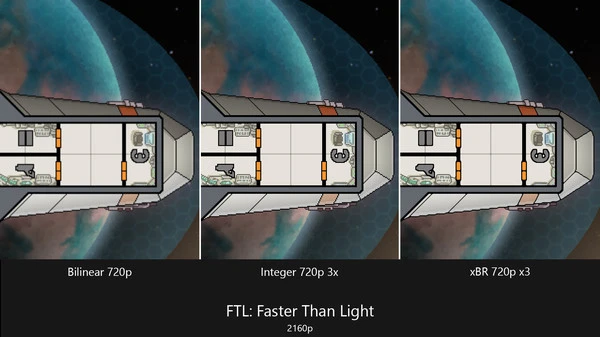
  • xBR: Pattern-based pixel art upscaling for retro games

WHO CAN BENEFIT?

Lossless Scaling helps gamers across all hardware tiers and gaming styles

Budget Gamers

Transform your budget laptop or weak PC into a capable gaming machine. Play modern AAA titles at 60+ FPS even on GTX 750 Ti, RX 550, or integrated graphics.

  • • GTX 1050 / RX 560 users
  • • Integrated GPU laptops
  • • Budget gaming setups

Competitive Players

Achieve 144+ FPS in competitive titles like Valorant, CS:GO, and Apex Legends. LSFG 3.0's competitive mode ensures minimal input lag for professional-level gameplay.

  • • Esports professionals
  • • Ranked match players
  • • Tournament competitors

Portable Gamers

Maximize battery life while maintaining smooth gameplay on laptops and portable devices. Game for hours longer with optimized power-efficient settings.

  • • Laptop gamers
  • • Travel gaming enthusiasts
  • • Battery-conscious users

Retro Gamers

Perfect upscaling for pixel art games, emulators, and retro titles. Anime4K and xBR algorithms preserve the authentic look while enhancing clarity.

  • • Emulator users
  • • Indie game players
  • • Retro gaming enthusiasts

4K Gamers

Render at lower resolutions and upscale to 4K for stunning visuals without the performance hit. Maintain high frame rates on 4K displays.

  • • 4K display owners
  • • High-resolution gamers
  • • Visual quality enthusiasts

Content Creators

Record smooth gameplay footage at high frame rates. Maintain consistent FPS for professional-quality streaming and video production.

  • • Streamers
  • • Video creators
  • • Game reviewers

LSFG 2.3 VS LSFG 3.0

Detailed comparison to help you choose the right frame generation version

Feature LSFG 2.3 LSFG 3.0
Input Lag ~2-3ms <1ms (40% reduction)
Artifact Reduction Good Excellent
Competitive Gaming Not Recommended Recommended (Competitive Mode)
Fast Motion Handling Moderate Excellent
GPU Overhead Low (~5%) Low (~7%)
Temporal Analysis Single frame Multi-frame
Best For Single-player games, casual gaming All game types, competitive gaming

Recommendation: Use LSFG 3.0 for all scenarios unless you experience compatibility issues with specific games.

Learn More About LSFG 3.0

SEE IT IN ACTION

Real screenshots showcasing Lossless Scaling's powerful interface and features

Lossless Scaling Frame Generation Settings Interface

Frame Generation Settings

LSFG 3.0 Configuration Panel

Lossless Scaling Upscaling Methods Selection

Upscaling Algorithms

FSR, NIS, Anime4K, xBR & More

Lossless Scaling Performance Metrics Display

Performance Metrics

Real-time FPS & Statistics

Lossless Scaling Game Compatibility Settings

Game Compatibility

1000+ Supported Games

Lossless Scaling Advanced Optimization Options

Advanced Settings

Full Customization Options

PRO TIPS & TRICKS

Expert strategies to maximize your gaming performance with Lossless Scaling

Optimization Tips

  • Base FPS Matters: Ensure your game runs at stable 30+ FPS before enabling frame generation. Lower base FPS will result in stuttering.
  • Resolution Scaling: For best results, render at 75-85% of target resolution, then upscale. This provides optimal balance between quality and performance.
  • Combine Technologies: Use upscaling + frame generation together for maximum FPS boost. This is especially effective on weaker hardware.
  • Game-Specific Profiles: Create different profiles for different games. Competitive games need different settings than single-player titles.
  • Monitor GPU Usage: Keep GPU usage below 95% to prevent thermal throttling. Adjust settings if you see performance drops.

Performance Tricks

  • Close Background Apps: Disable unnecessary background applications, especially RGB software, browser tabs, and Discord overlays to free up GPU resources.
  • Update Drivers: Always use the latest GPU drivers. Newer drivers often include optimizations that improve frame generation performance.
  • Disable V-Sync: Turn off V-Sync in both the game and Lossless Scaling for lowest input lag. Use frame rate limiting instead if needed.
  • Windowed Mode: Use borderless windowed mode for best compatibility. Some games work better in exclusive fullscreen, but windowed is more reliable.
  • Test Different Algorithms: Don't stick to one upscaling method. FSR might work better for some games, while NIS or LS1 might be superior for others.

GAME COMPATIBILITY

Lossless Scaling works with over 1000+ games. Here are some popular titles with verified compatibility

Competitive Games

  • ✓ Valorant
  • ✓ CS:GO / CS2
  • ✓ Apex Legends
  • ✓ Overwatch 2
  • ✓ Rainbow Six Siege
  • ✓ Fortnite
  • ✓ Rocket League

AAA Titles

  • ✓ Cyberpunk 2077
  • ✓ Elden Ring
  • ✓ The Witcher 3
  • ✓ Red Dead Redemption 2
  • ✓ Assassin's Creed Valhalla
  • ✓ Call of Duty: Modern Warfare
  • ✓ Battlefield 2042

Indie & Retro

  • ✓ Hollow Knight
  • ✓ Celeste
  • ✓ Stardew Valley
  • ✓ Emulated Games (SNES, PS1, etc.)
  • ✓ Visual Novels
  • ✓ Pixel Art Games
  • ✓ 2D Platformers

Compatibility Notes

Lossless Scaling works with most DirectX 9, 10, 11, and 12 games, as well as OpenGL titles. Games with aggressive anti-cheat systems (like Valorant's Vanguard) may require running in windowed mode. Some games with exclusive fullscreen may need borderless windowed mode enabled. Always check our troubleshooting guide if you encounter issues.

Pro Tip: If a game doesn't work initially, try different window modes (windowed, borderless, exclusive fullscreen) and ensure the game window is focused when pressing the scaling hotkey (default: F11).

REAL-WORLD EXAMPLES

See how Lossless Scaling transforms gaming experiences across different hardware configurations

Budget Laptop Transformation

Hardware: GTX 1650 Laptop, Intel i5-9300H, 8GB RAM

Cyberpunk 2077 (1080p)
Before: 28 FPS → 58 FPS
Elden Ring (1080p)
Before: 32 FPS → 64 FPS
Settings Used LSFG 3.0 + FSR Performance (0.75x)

Key Takeaway

By rendering at 810p and upscaling to 1080p, then using frame generation, this budget laptop achieved playable frame rates in demanding AAA titles that were previously unplayable.

Competitive Gaming Setup

Hardware: RTX 3060, Ryzen 5 5600X, 16GB RAM

Valorant (1440p)
Before: 180 FPS → 360 FPS
CS:GO (1440p)
Before: 200 FPS → 400 FPS
Settings Used LSFG 3.0 Competitive Mode

Key Takeaway

LSFG 3.0's competitive mode provides massive FPS boosts while maintaining sub-1ms input lag, making it perfect for professional esports gameplay.

Portable Gaming Success

Hardware: RTX 3050 Laptop, Ryzen 7 5800H, 16GB RAM

Battery Life (Gaming)
Before: 1.5 hours → 2.5 hours
The Witcher 3 (1080p)
Before: 45 FPS → 60 FPS
Settings Used LSFG 2.3 + FSR Balanced (0.80x)

Key Takeaway

Power-efficient settings extend battery life by 40-50% while maintaining smooth 60 FPS gameplay, perfect for travel and portable gaming sessions.

ESSENTIAL GUIDES

Master every aspect of Lossless Scaling with our comprehensive tutorials

3.0

LSFG 3.0: Next Generation

LATEST

Discover the revolutionary improvements in LSFG 3.0: drastically reduced input lag, superior artifact handling, enhanced motion clarity, and game-changing compatibility with modern AAA titles.

Read Complete Guide

Laptop Optimization Guide

POPULAR

Complete configuration guide for optimal laptop performance. Learn battery optimization techniques, frame rate targeting, game-specific profiles, and power management strategies.

Read Complete Guide

Troubleshooting Guide

ESSENTIAL

Solve common issues: input lag reduction, ghosting elimination, artifact fixes, black screen solutions, and game-specific compatibility troubleshooting for over 100 popular titles.

Read Complete Guide

Upscaling Methods Explained

IN-DEPTH

Master FSR, NIS, Anime4K, xBR, and LS1 algorithms. Understand when to use each method for competitive games, single-player RPGs, pixel art indie titles, and retro emulators.

Read Complete Guide

PERFORMANCE BENCHMARKS

Real-world performance improvements across popular games

Cyberpunk 2077

Base FPS 32 FPS
With LSFG 3.0 64 FPS
+100% Performance

Elden Ring

Base FPS 45 FPS
With LSFG 3.0 90 FPS
+100% Performance

Valorant

Base FPS 120 FPS
With LSFG 3.0 240 FPS
+100% Performance

QUICK START GUIDE

Get started with Lossless Scaling in minutes

1

Download & Install

Get Lossless Scaling and install it on your Windows PC

2

Launch Your Game

Start your game in windowed or borderless windowed mode

3

Activate Scaling

Press the hotkey (default: F11) to activate Lossless Scaling

4

Enjoy Boosted FPS

Experience smooth gameplay with up to 2x frame rate boost

GETTING STARTED GUIDE

Follow these simple steps to start boosting your FPS in minutes

1

Download & Install

Download Lossless Scaling from the official website. The installation is straightforward - just run the installer and follow the on-screen instructions. The entire process takes less than 2 minutes.

  • • Download the latest version (includes LSFG 3.0)
  • • Run the installer as Administrator
  • • Choose installation directory (default is recommended)
  • • Complete the installation
2

Configure Settings

Launch Lossless Scaling and configure your preferred settings. For beginners, we recommend starting with the default presets and adjusting based on your hardware and game type.

  • • Select LSFG 3.0 (or 2.3 for compatibility)
  • • Choose upscaling method (FSR recommended for beginners)
  • • Set resolution scale (0.75-0.85 for best results)
  • • Configure hotkey (default: F11)
3

Launch Your Game

Start your game in windowed or borderless windowed mode. Make sure the game window is focused, then press the scaling hotkey (F11 by default) to activate Lossless Scaling.

  • • Launch game in windowed/borderless mode
  • • Ensure game window is focused
  • • Press F11 (or your custom hotkey)
  • • Verify scaling is active (check FPS counter)
4

Optimize & Enjoy

Fine-tune settings based on your experience. Adjust frame generation intensity, try different upscaling methods, and create game-specific profiles for optimal performance in each title.

  • • Monitor FPS and GPU usage
  • • Adjust settings for best balance
  • • Create profiles for different games
  • • Experiment with different algorithms

Need Help Getting Started?

Check out our comprehensive guides for detailed setup instructions, optimal settings for your hardware, and troubleshooting common issues.

FREQUENTLY ASKED QUESTIONS

Q: What is Lossless Scaling and how does it work?

Lossless Scaling is a Windows application that uses advanced frame generation and upscaling technologies to boost gaming FPS. It generates intermediate frames between existing ones and intelligently upscales lower resolutions to higher displays, providing smoother gameplay and better performance across all hardware configurations.

Q: What's the difference between LSFG 2.3 and LSFG 3.0?

LSFG 3.0 is the next-generation frame generation technology featuring drastically reduced input lag (down to <1ms), improved motion clarity, better artifact handling, and enhanced compatibility with modern games. It offers significantly superior image quality and responsiveness compared to LSFG 2.3, especially in fast-paced competitive titles.

Q: Can Lossless Scaling help my low-end laptop run modern games?

Absolutely! Lossless Scaling is designed to work across all hardware tiers. By intelligently generating frames and upscaling resolutions, even budget laptops and weak PCs can achieve playable frame rates in modern games. Many users report transforming 30 FPS experiences into smooth 60+ FPS gameplay.

Q: Does frame generation add input lag?

When properly configured, Lossless Scaling adds minimal input lag—typically less than 1 millisecond with LSFG 3.0. Our guides provide optimized settings for competitive gaming that prioritize responsiveness. Many professional esports players use Lossless Scaling without any noticeable latency impact.

Q: Where can I download Lossless Scaling?

Lossless Scaling is completely free to download. Visit our download page for direct links to the official website. The software receives regular free updates with new features and improvements at no cost.

READY TO BOOST YOUR FPS?

Join thousands of gamers who have transformed their gaming experience with Lossless Scaling